Read any menu like a local.
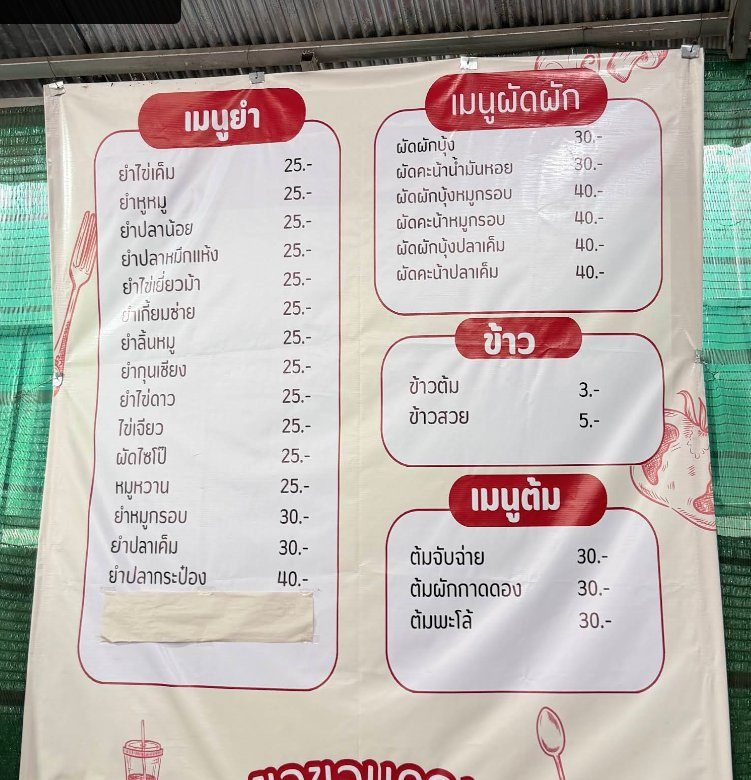 Before
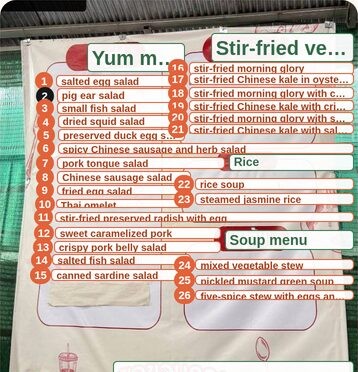 With MenuNative
Snap the menu: every dish is translated and explained right where it is written, and the original stays readable. Pick your dishes, then show your screen to the waiter, in their own language.
- No account
- 3 free scans
- Then €2.99/month, cancel anytime
Three moments you probably know
You can’t read the menu.
No English menu, letters you don’t even recognise. So you walk back to the tourist place.
You don’t know how it’s eaten.
Even translated, “yam” or “tsukemen” mean nothing to you. And you’d rather not get it wrong at the table.
You don’t know how to order.
You point at the menu at random, the waiter hesitates, and you’re not quite sure what’s coming.
A photo translator replaces the text. MenuNative keeps it.
Here the AI tells you what the dish is, instead of translating its words one by one. And the original menu stays there, so the waiter can read it.
- The translation is printed over the text: the waiter can no longer read your screen.
- Word for word, ยำหูหมู reads “mix · ear · pig”. Not much help.
- To understand the dish you ask a chatbot, then work out which answer goes with which line.
- Every dish is found in place on the photo, numbered and translated. One tap brings the original back.
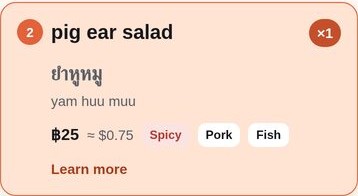
- ยำหูหมู becomes “pig ear salad”, with how spicy it is and its main ingredients.
- Translation, explanation and order in one place.
Three steps, and you’ve ordered
-
Snap the menu.
No need to pick the language. Dishes appear one by one while you read the first ones, and a menu of several pages makes one single order.
-
Understand every dish where it is.
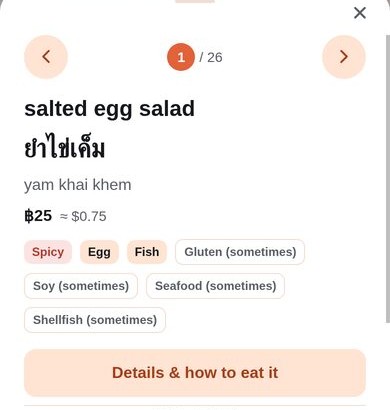
The translation, what it really is, whether it’s spicy, the allergens it usually contains, and how to eat it.
-
Show the waiter.
Pick your dishes and quantities. The waiter screen shows them large, in their language: they read it and nod.
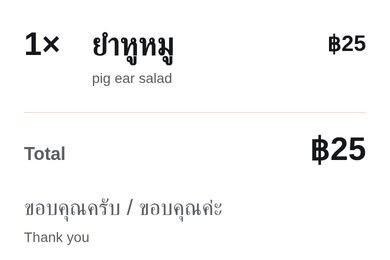
Coming next: the sentence to order out loud (“not spicy, please”), with pronunciation.
Not just a translation: what it is, and how to eat it
The kind of card the app shows for every dish.
-
Thailand (North)
ข้าวซอย
khao soi
Coconut curry noodle soup
Egg noodles in a coconut milk curry, topped with crispy fried noodles. Chiang Mai’s signature dish.
How to eat itSqueeze the lime, add the shallots and pickled mustard greens served on the side, stir.
-
Thailand
ผัดกะเพรา
phat kaphrao
Holy basil stir-fry
Minced meat stir-fried with holy basil, garlic and chilli, served over rice. Often spicy.
How to eat itAsk for “khai dao” to get a fried egg on top, break the yolk and mix it into the rice.
-
Thailand (Isan)
ส้มตำ
som tam
Green papaya salad
Green papaya pounded in a mortar with lime, fish sauce, chilli and peanuts. Sour, sweet, often very spicy.
How to eat itWith sticky rice, rolled into a small ball between your fingers.
-
Vietnam (Hanoi)
Bún chả
boon chah
Grilled pork and rice noodles
Grilled pork in a bowl of sweet and sour dipping broth, with rice vermicelli and fresh herbs on the side.
How to eat itPick up noodles and herbs with chopsticks, dip them in the broth, eat.
-
Korea
비빔밥
bibimbap
Mixed rice bowl
Rice topped with vegetables, meat and an egg, with a chilli paste (gochujang).
How to eat itMix everything with the spoon before eating, and add the chilli paste to taste.
-
Japan
つけ麺
tsukemen
Dipping noodles
Noodles served separately, next to a very rich, concentrated broth.
How to eat itDip the noodles into the broth one bite at a time. At the end, ask for light broth to drink the rest.
Explanations are AI-generated: spiciness and ingredients vary from one restaurant to another.
to replace
(portrait in front of a menu, 800 × 1000)
Why I’m building MenuNative
I’m Fiona, a freelance developer. I lived in Korea for five years: I could read Hangul, and still, in front of a menu, I had no idea what the dishes were. In Japan, it was the kanji.
Next stop Chiang Mai, then Da Nang. Google Lens translates, but it overwrites the original text: no way to show my phone to the waiter. And to understand a dish, I had to go through ChatGPT, line by line.
So I’m building the app I need, and testing it myself first in real local places in Thailand. I share it all along the way on @fiona.nomad (in French): tell me what you’d want in it.
Good to know before you order
Translations and explanations are generated by AI: they can be wrong. The allergens shown are those usually found in the dish, not necessarily in this restaurant’s recipe. If you have an allergy or intolerance, always ask the staff.
Questions
When is it coming out?
No date yet. I’m testing the app in real restaurants right now. Leave your e-mail: I’ll write when it launches, and invite you to the beta if you want to try it first.
How much will it cost?
3 free scans to try it, and the waiter screen stays free. After that, planned launch prices: €2.99/month, cancel anytime, €19.99/year, or €49.99 once for life (fair use, around 300 scans a month). No weekly subscription.
Do I need an account?
No: on iPhone and Android the app works without an account. On the web, an account is only needed to pay.
Which languages?
The app is designed first for menus in Thai, Vietnamese, Japanese and Korean, where you can’t read the local script. The app itself is in English, French and Spanish.
Why not just Google Lens and ChatGPT?
Lens replaces the menu’s text with its translation: you can’t show your screen anymore. ChatGPT explains, but in one block, and you have to work out which answer goes with which line. MenuNative does both on the photo, dish by dish, and keeps the original.
What if I have an allergy?
The app shows the allergens usually found in each dish, as a guide. It is not a guarantee: always ask the staff.
What do you do with my e-mail?
It is only used to tell you about the launch and the beta. It is never sold or shared, and you can unsubscribe or ask for deletion at any time. Details on the privacy page.
Travelling soon?
Leave your e-mail, and I’ll let you know as soon as MenuNative is ready.